> ## Documentation Index
> Fetch the complete documentation index at: https://docs-stg.outerlayer.ai/llms.txt
> Use this file to discover all available pages before exploring further.
# API keys
> Mint a key, choose its permissions, and give it to the CLI once.
An API key identifies one caller. Every CLI command that reaches your factory uses a credential: an API key, or your own login. What a key does is attributed to that key. Give each machine a key of its own.
These are factory keys: each one works inside one factory. To manage the organization itself from a script, its members, roles and audit log, use a management API key. See [Organization API](/organization-api).
## Create a key
Open the factory, then **Settings → API keys**, and choose **Create API key**. Name it after what will use it, such as `laptop` or `ci`. The key is shown once, with a copy button. It is not shown again.
## Choose a preset
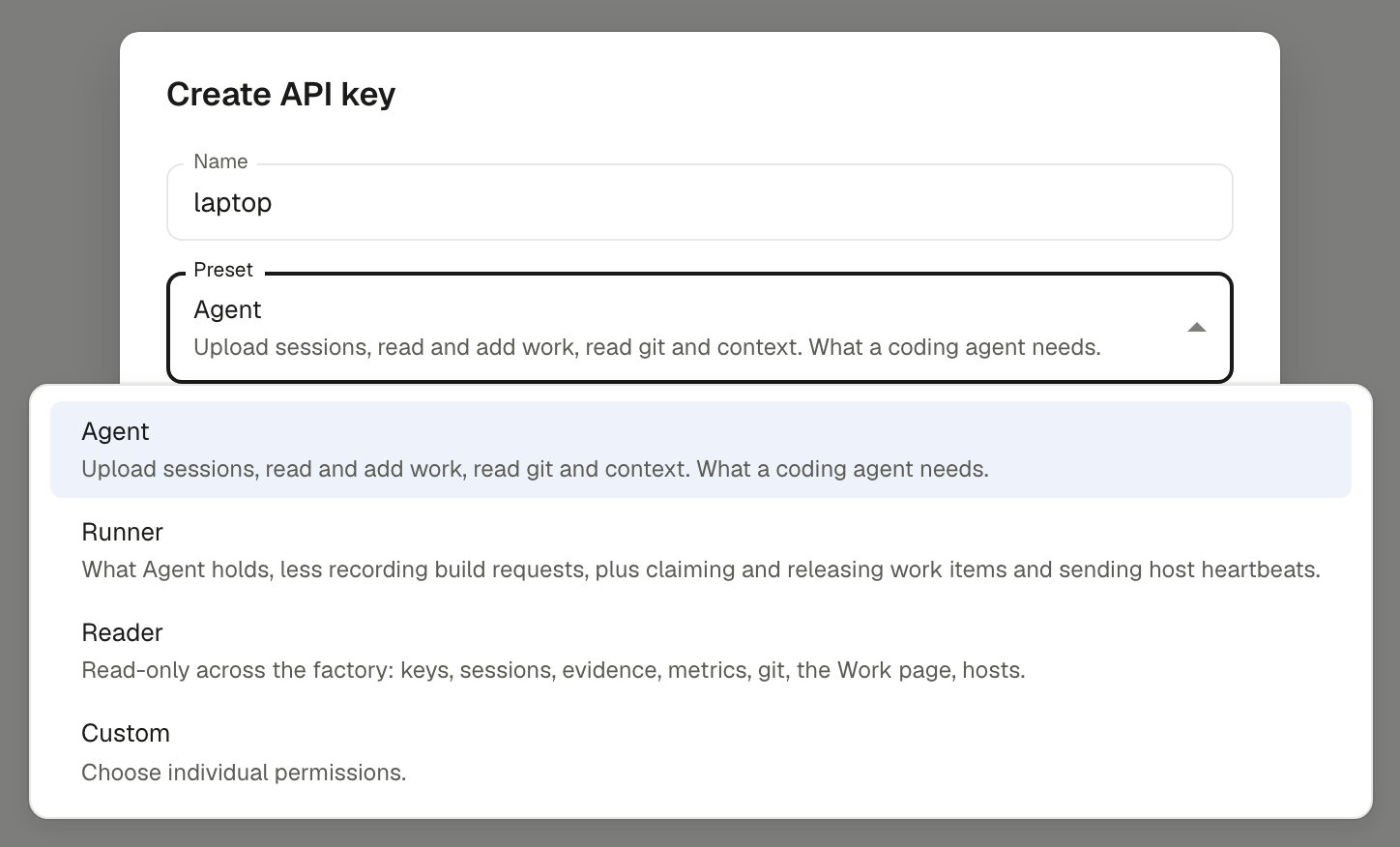
The dialog asks for a preset. Each preset is a fixed set of permissions, and **Custom** lets you tick them one by one.
 | Preset | Carries | Use it for |
| - | - | - |
| **Agent** (`agent`) | `sessions.ingest`, `sessions.read`, `evidence.insert`, `work.read`, `work.insert`, `spec.insert`, `spec.update`, `git.read`, `context.read` | The CLI on a developer machine. The default. |
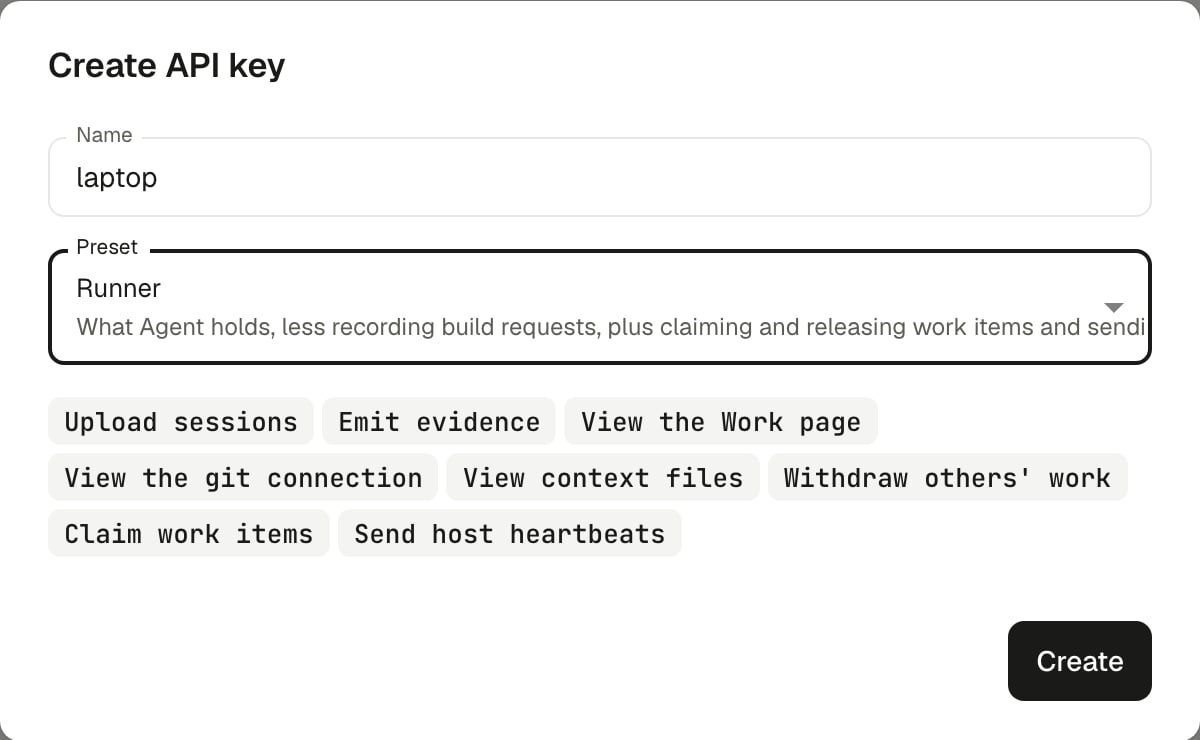
| **Runner** (`runner`) | Everything Agent carries except `sessions.read`, `work.insert`, `spec.insert` and `spec.update`, plus `work.update`, `work.claim` and `hosts.ingest` | An unattended runner claiming and working queued items. |
| **Reader** (`reader`) | Every read permission except `sessions.read_team`: `context.read`, `evidence.read`, `factory.read`, `factory_keys.read`, `git.read`, `hosts.read`, `metrics.read`, `sessions.read`, `work.read` | Dashboards and BI tools. It cannot mint or edit keys, and session actors come back anonymized. |
| **Custom** (`custom`) | Whatever you tick | Anything narrower. |
A preset's permissions are copied onto the key when it is made. A later change to a preset does not reach existing keys. Edit the key to add a missing permission. A key made before `spec.insert` and `spec.update` existed needs them added before `spec file` or `spec edit` works.
| Preset | Carries | Use it for |
| - | - | - |
| **Agent** (`agent`) | `sessions.ingest`, `sessions.read`, `evidence.insert`, `work.read`, `work.insert`, `spec.insert`, `spec.update`, `git.read`, `context.read` | The CLI on a developer machine. The default. |
| **Runner** (`runner`) | Everything Agent carries except `sessions.read`, `work.insert`, `spec.insert` and `spec.update`, plus `work.update`, `work.claim` and `hosts.ingest` | An unattended runner claiming and working queued items. |
| **Reader** (`reader`) | Every read permission except `sessions.read_team`: `context.read`, `evidence.read`, `factory.read`, `factory_keys.read`, `git.read`, `hosts.read`, `metrics.read`, `sessions.read`, `work.read` | Dashboards and BI tools. It cannot mint or edit keys, and session actors come back anonymized. |
| **Custom** (`custom`) | Whatever you tick | Anything narrower. |
A preset's permissions are copied onto the key when it is made. A later change to a preset does not reach existing keys. Edit the key to add a missing permission. A key made before `spec.insert` and `spec.update` existed needs them added before `spec file` or `spec edit` works.
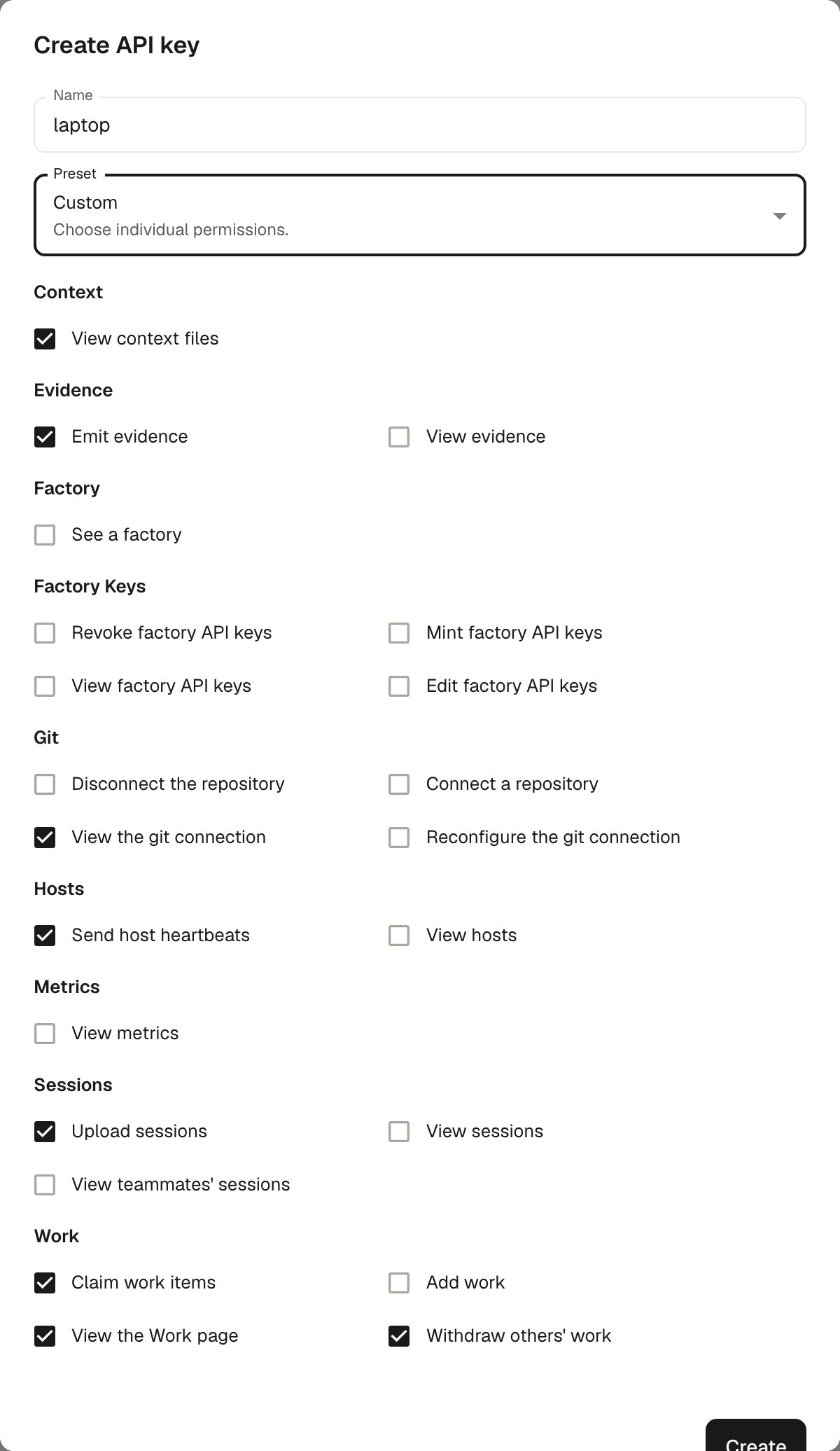
 The Agent preset covers the commands a developer runs in a session, including `spec file` and `spec edit`. It lacks `work.update`, which `work stop` and `work remove` on someone else's addition need. It also lacks `metrics.read`, which the [MCP server](/mcp#tools)'s cost and trend tools need. The key the setup panel creates uses the Agent preset. To build a narrower key, pick **Custom** and tick what you need:
 | Permission | What it allows | Needed by |
| - | - | - |
| `sessions.ingest` | Upload agent sessions. | `sync` |
| `work.insert` | Add work, request a build, link a session and renew its claim, declare a pull request, remove your own addition. | `work build`, `work link-session`, `work pr`, `work open-pr` in your own session, `work remove` on your own addition |
| `work.read` | Look a work item up, and find where a spec would go and what already exists. | `work status`, `work list`, `work logs`, `spec target`, `spec search`, and `work remove` when you name the issue rather than the item number |
| `work.update` | Withdraw an addition somebody else recorded. Stop a runner's build. | `work remove` on another caller's addition, `work stop` |
| `spec.insert` | File a spec as a new issue in the factory's tracker. | `spec file` |
| `spec.update` | Replace the body of an issue that holds a spec. | `spec edit` |
| `work.claim` | Claim, renew and release an item. | `work claim`, `work renew`, `work release`, `runner` |
| `evidence.insert` | Record a check, or emit an artifact, result or finding. | `emit` |
`work threads` and `work logs` need `work.read`. `work comment` needs `work.insert`, `evidence.insert` or `work.review`, depending on what it records. See [`work comment`](/reference/cli-work#outerlayer-work-comment).
## Give the key to the CLI
```bash theme={"system"}
echo "$OUTERLAYER_KEY" | outerlayer login --url https://api.outerlayer.ai --app-id
```
The key is read from stdin when piped. It is never a command-line flag, so it never lands in shell history or process listings.
A piped key needs `--url https://api.outerlayer.ai`; there is no default. `--app-id` takes the **Factory Id**, which is on **Settings → General** with a copy button.
To sign in without a key, run `outerlayer login` with nothing piped and approve it in the dashboard. Then run `outerlayer connect` to choose a factory. The machine then holds a login for your account, not a key. A factory key always [wins over a login](/reference/cli#credential-resolution). See [Cloud commands](/reference/cli-cloud).
The dialog that reveals a new key shows this command with all three already filled in, so you can copy it from there. Its copy runs the CLI through `npx @outerlayer/cli`, which needs no global install. `login` writes `~/.outerlayer/config.json` with owner-only permissions.
## Use a key in CI
Set three environment variables instead of running `login`:
```bash theme={"system"}
OUTERLAYER_URL=https://api.outerlayer.ai
OUTERLAYER_API_KEY=
OUTERLAYER_APP_ID=
```
Every command reads them before it reads the config file. See [Environment variables](/reference/environment-variables).
## Make your first API call
The Agent preset carries `work.read`, which listing work items needs. See [Make a request](/api-reference/introduction#make-a-request) for the call, and [Errors](/api-reference/introduction#errors) for what a refusal means.
## Rotate or revoke
Delete the key from **Settings → API keys**. Callers are refused within about five minutes, once the gateway's cached copy of it expires. Create a new key and run `login` again on each machine. `outerlayer mcp serve` reads the config when it starts, so your editor picks up a new key the next time it connects.
## Runner keys
A runner needs a key with the **Runner** preset, created here, because a login never creates one. A runner key, one that holds `work.claim`, is bound to the host key of the first machine that claims with it. **Settings → API keys** shows each bound key's host key fingerprint and when it was bound, and **Clear host key** frees it for a new machine. On an Enterprise plan, the organization audit log records each binding, each clearing, and each request refused for its signature. See [Give the runner its key](/set-up-a-host#give-the-runner-its-key) and [Moving a runner to a new host](/run-a-host-as-a-service#moving-a-runner-to-a-new-host).
## Limits
On OuterLayer Cloud, the Free and Growth plans allow 25 keys per organization, counted across every factory in it. Team and Enterprise have no limit.
This documentation is built and hosted on [Mintlify](https://mintlify.com), a developer documentation platform.
| Permission | What it allows | Needed by |
| - | - | - |
| `sessions.ingest` | Upload agent sessions. | `sync` |
| `work.insert` | Add work, request a build, link a session and renew its claim, declare a pull request, remove your own addition. | `work build`, `work link-session`, `work pr`, `work open-pr` in your own session, `work remove` on your own addition |
| `work.read` | Look a work item up, and find where a spec would go and what already exists. | `work status`, `work list`, `work logs`, `spec target`, `spec search`, and `work remove` when you name the issue rather than the item number |
| `work.update` | Withdraw an addition somebody else recorded. Stop a runner's build. | `work remove` on another caller's addition, `work stop` |
| `spec.insert` | File a spec as a new issue in the factory's tracker. | `spec file` |
| `spec.update` | Replace the body of an issue that holds a spec. | `spec edit` |
| `work.claim` | Claim, renew and release an item. | `work claim`, `work renew`, `work release`, `runner` |
| `evidence.insert` | Record a check, or emit an artifact, result or finding. | `emit` |
`work threads` and `work logs` need `work.read`. `work comment` needs `work.insert`, `evidence.insert` or `work.review`, depending on what it records. See [`work comment`](/reference/cli-work#outerlayer-work-comment).
## Give the key to the CLI
```bash theme={"system"}
echo "$OUTERLAYER_KEY" | outerlayer login --url https://api.outerlayer.ai --app-id
```
The key is read from stdin when piped. It is never a command-line flag, so it never lands in shell history or process listings.
A piped key needs `--url https://api.outerlayer.ai`; there is no default. `--app-id` takes the **Factory Id**, which is on **Settings → General** with a copy button.
To sign in without a key, run `outerlayer login` with nothing piped and approve it in the dashboard. Then run `outerlayer connect` to choose a factory. The machine then holds a login for your account, not a key. A factory key always [wins over a login](/reference/cli#credential-resolution). See [Cloud commands](/reference/cli-cloud).
The dialog that reveals a new key shows this command with all three already filled in, so you can copy it from there. Its copy runs the CLI through `npx @outerlayer/cli`, which needs no global install. `login` writes `~/.outerlayer/config.json` with owner-only permissions.
## Use a key in CI
Set three environment variables instead of running `login`:
```bash theme={"system"}
OUTERLAYER_URL=https://api.outerlayer.ai
OUTERLAYER_API_KEY=
OUTERLAYER_APP_ID=
```
Every command reads them before it reads the config file. See [Environment variables](/reference/environment-variables).
## Make your first API call
The Agent preset carries `work.read`, which listing work items needs. See [Make a request](/api-reference/introduction#make-a-request) for the call, and [Errors](/api-reference/introduction#errors) for what a refusal means.
## Rotate or revoke
Delete the key from **Settings → API keys**. Callers are refused within about five minutes, once the gateway's cached copy of it expires. Create a new key and run `login` again on each machine. `outerlayer mcp serve` reads the config when it starts, so your editor picks up a new key the next time it connects.
## Runner keys
A runner needs a key with the **Runner** preset, created here, because a login never creates one. A runner key, one that holds `work.claim`, is bound to the host key of the first machine that claims with it. **Settings → API keys** shows each bound key's host key fingerprint and when it was bound, and **Clear host key** frees it for a new machine. On an Enterprise plan, the organization audit log records each binding, each clearing, and each request refused for its signature. See [Give the runner its key](/set-up-a-host#give-the-runner-its-key) and [Moving a runner to a new host](/run-a-host-as-a-service#moving-a-runner-to-a-new-host).
## Limits
On OuterLayer Cloud, the Free and Growth plans allow 25 keys per organization, counted across every factory in it. Team and Enterprise have no limit.
This documentation is built and hosted on [Mintlify](https://mintlify.com), a developer documentation platform.