> ## Documentation Index
> Fetch the complete documentation index at: https://docs-stg.outerlayer.ai/llms.txt
> Use this file to discover all available pages before exploring further.
# Review and merge
> Review a work item on its page, ask the agent for changes, approve it, and merge its pull requests.
export const StatusIcon = ({status}) => {
const ring = (extra = {}) => ;
const tick = "m6.6 10.2 2.3 2.3 4.6-5";
const glyphs = {
not_started: ring(),
queued: ring({
strokeDasharray: "2.6 2.4"
}),
not_picked_up: <>
{ring({
strokeDasharray: "2.6 2.4"
})}
,
with_agent: <>
{ring()}
,
ready_for_review: <>
{ring()}
,
approved: <>
{ring()}
,
done: <>
,
done_unverified: <>
,
closed: <>
{ring()}
,
needs_attention: <>
};
return ;
};
You review a work item on its page in the dashboard. From there you approve it and merge its pull requests, or send the agent back with comments. To record a named pass or fail from CI or a terminal instead, see [Record a check](/attach-evidence#record-a-check). To find an item, see [The Work page](/the-work-page).
## The item page is the review
The page has four tabs. A sidebar beside them shows the review, the latest build, the pull requests, the sessions, time and cost, and the issue.
* **Activity** is the item's history, oldest first, with what is left before merge at the end. See [The Activity tab](#the-activity-tab).
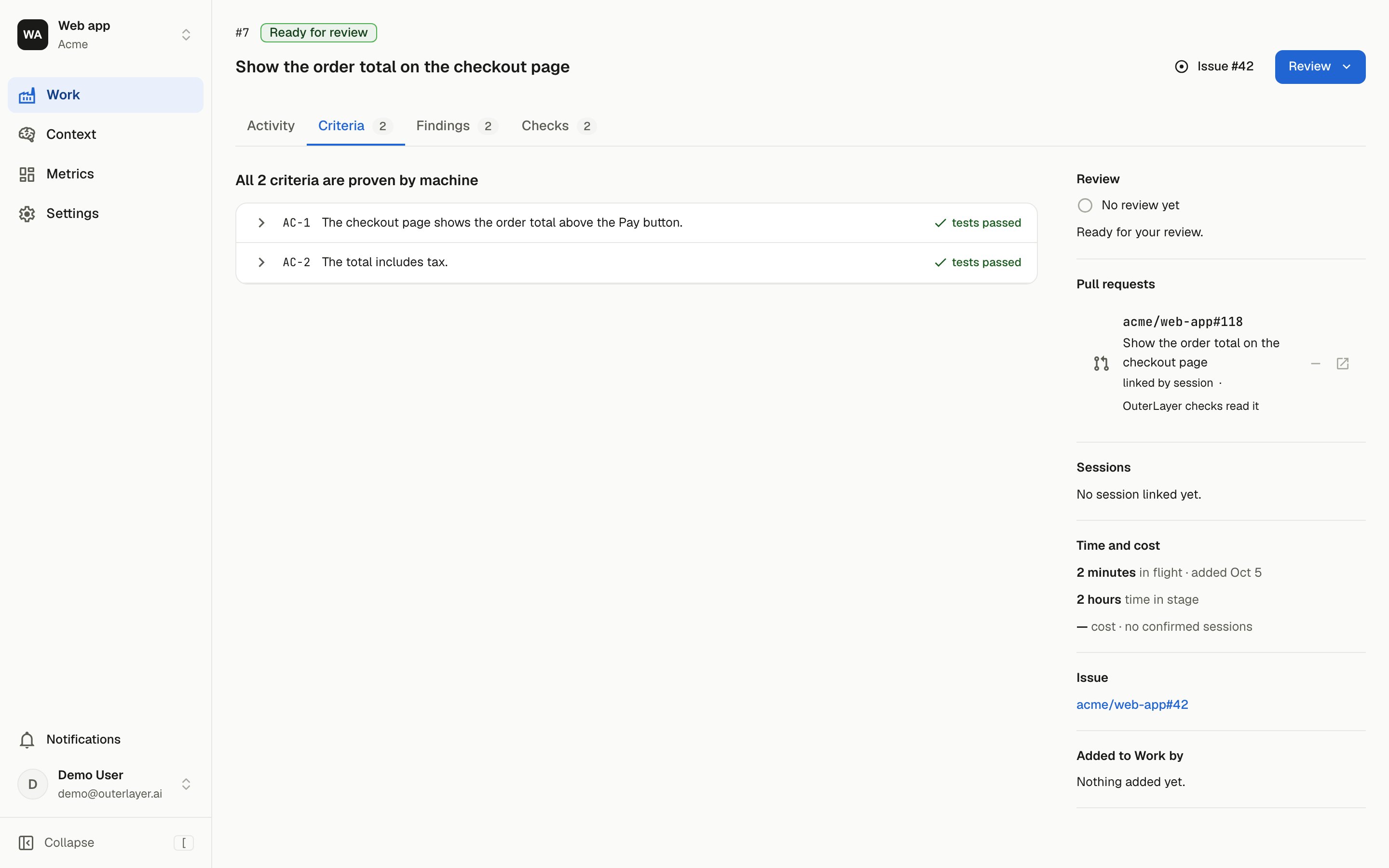
* **Criteria** is where you review. Every acceptance criterion of the item is a row, as recorded with [`outerlayer emit criteria`](/reference/cli-emit#outerlayer-emit-criteria). Each row shows the criterion, whether its declared proof is attached, and its whole conversation with the agent. You write notes here. See [The Criteria tab](#the-criteria-tab).
* **Findings** lists problems agents hit in the factory while working on the item. They do not affect whether the work passes. See [Findings](/findings).
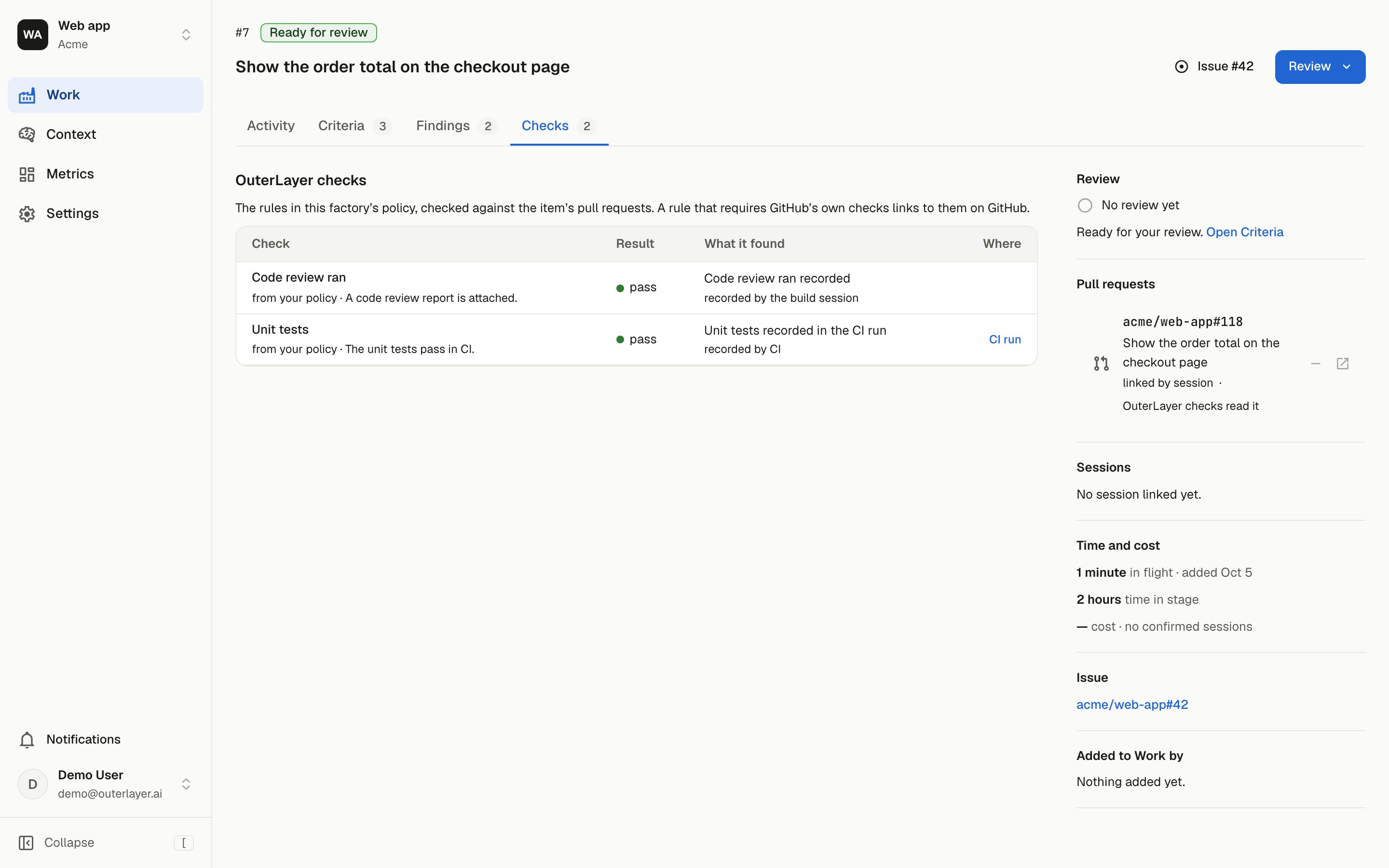
* **Checks** holds what the OuterLayer checks decided, across every pull request on the item. GitHub's own check runs stay on GitHub.
The first time you look, a row declaring a screenshot or a video opens with that artifact in place. After a verdict, rows with nothing new show *Unchanged since you looked*.
For an item a runner built, the runner records the `acceptance-criteria` row itself. Its judge reads each recorded criterion and the test that cites it, and the row links the judge's report. See [A judge on your host](/write-a-validator#a-judge-on-your-host). An item built in a local session has no such row.
A check that carries [check items](/policy-and-validators#check-items) lists its failing ones under its row, each with its reason.
When a pull request on the item changes a file under `.outerlayer/`, the header carries a chip that says how many repositories the change reaches. A callout above the tabs lists the edited files and links to [the setup below](#require-a-persons-review-of-rules-changes).
### The Activity tab
Activity is the item's history, oldest first. It starts with the issue's description, the ask you review against. A build that did not finish cleanly says why on its line. Each review you sent is one card, and the agent's answer to it is its own card. Activity is read-only.
Each step an agent reports with `outerlayer emit step` is its own entry, such as *Plan started by build-01*. A running build's newest step is highlighted and shows how long ago it started. Once a build ends, its steps fold into one entry, such as *6 steps by build-01 · last: Open pull request*, and selecting it lists them. A new step reaches an open page within a few seconds.
While a build works inside a subagent, the subagent shows as a line under the build's newest step. The line gives the subagent's name, how long it has run, when it last acted, and its last tool. It reads, for example, *Implement the change is working · running 54m · last acted 20s ago · last tool: Bash*.
* The name links to the subagent's session.
* The line shows the tool's name only, never its input or output.
* The line refreshes about once a minute.
* A subagent that stopped reporting while its build still runs reads *stopped reporting*, with how long ago it last reported. OuterLayer does not decide that a build is stalled. You decide from when it last acted.
* A subagent that ends leaves Activity. Its session page keeps its history.
A box at the end sums up what is left before merge (see [below](#the-box-at-the-end-of-activity)).
### The box at the end of Activity
The box has four rows, top to bottom:
1. **Review**: whether a person approved the item or asked for changes, and whose turn it is. It reads *Waiting on an agent since* a time, *An agent is answering your review* while an agent holds the item, or *N new replies* with a link to each row.
2. **OuterLayer checks**: how many passed, and each failing one by name.
3. **GitHub**: each pull request's standing on GitHub.
4. **Merge**: the **Merge pull request** button.
While the item waits on you, a banner above the rows reads *Ready for your review* or *Back for your review*. The banner has an **Open Criteria** button.
### The Criteria tab
The tab reads only criteria recorded with `outerlayer emit criteria`, never the issue.
Above the rows, a **Proofs** strip shows every screenshot and video on the item as a thumbnail, labelled with the criterion it proves. Thumbnails follow the order the criteria are listed in. A video's thumbnail carries a play mark. Reports, logs and other files stay on their rows.
A criterion that declares a screenshot or a video and has none attached gets a slot after the thumbnails. It names the criterion and reads *Declares a screenshot, not attached yet* or *Declares a video, not attached yet*. An item with no screenshot or video attached or declared shows no strip.
Select a thumbnail to open the full-screen viewer on that proof, or **Step through all** to start on the first. The viewer steps through every proof in the strip, across criteria, and shows the criterion's id and the criterion's sentence under each one. A row's own viewer still steps only through that row's artifacts.
A row opens to show every round of its conversation in order: your notes, and the agent's replies beside the proof. A row can show one state next to its title:
* **Waiting for an agent**: you sent a note and no agent has picked it up.
* **Agent working**: an agent holds the item to answer your review.
* **New reply**: the agent answered after your latest review. The row opens by itself.
Sending the next review, or approving, clears *New reply*. To go on with a conversation, add a note to the next review. The tab's label shows how many rows have a new reply, for example *Criteria 3* with a badge reading 2.
When the issue holds no criteria, the build drafts the current list from the issue's description. Then a line above the rows reads *The build drafted these criteria from the issue's description. Replace them with `outerlayer emit criteria`.* To replace them, record your own list with [`outerlayer emit criteria`](/reference/cli-emit#outerlayer-emit-criteria) and your own login. The line goes away, and the tab says the list was replaced by you.
An item with no recorded list shows *No acceptance criteria are recorded for this item.* With the default `criteria.missing: warn`, a line under it says the pull request is flagged until a list is recorded.
A criterion missing its declared proof flags the pull request until the proof is attached. See [Recorded criteria in the verdict](/policy-and-validators#recorded-criteria-in-the-verdict).
A check item that names a criterion shows on that criterion's row. The row says what the check found, such as *Acceptance criteria: not satisfied*, with the reason, and lists the tests the check item cites. A criterion that a check found not satisfied reads *not satisfied* in its row's result.
The runner's report is linked at the top of the tab as **Host's criteria report**. A report bound with `--for acceptance-criteria` by a build or by CI is linked as **Criteria report**. When no check item names a criterion, its row lists the tests that report says cite it.
GitHub's reason a pull request cannot merge yet, such as a draft or conflicts, also appears on this tab.
### Statuses
The item's status says whose turn it is. It shows under the item's title on this page and beside the item on the Work page. Each status, and the `status:` filter word that finds it, is in [Statuses](/the-work-page#statuses).
## Submit a review
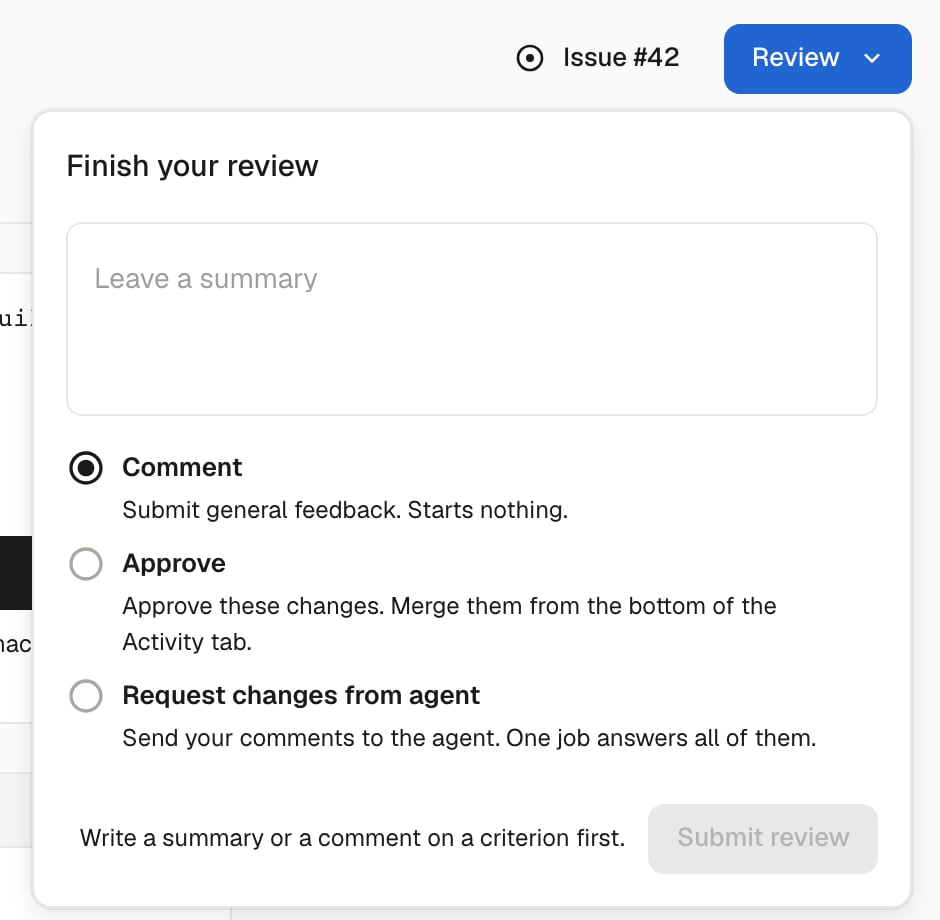
**Review** sits in the page header if you hold the **Record a review** permission. It is grayed out until the item is **Ready for review**; hover it to see why. It stays grayed out until the item has been evaluated and every session link has arrived. Once the item is **Approved**, the button is gone.
While the checks have not passed or a declared proof is missing, **Comment** and **Request changes from agent** work. **Approve** is disabled and says what it waits for.
A review takes a summary and one of three outcomes:
* **Comment** stores your comments and the summary as plain comments. It starts nothing.
* **Approve** approves the item. It does not merge anything (below).
* **Request changes from agent** sends your comments and the summary to the agent. It starts one agent job.
Notes you write on criteria rows are pending: they stay in your browser until you submit, and leaving the page discards them. They go with whichever outcome you choose.
## Approve and merge
Approving and merging are two steps, the way they are on a GitHub pull request.
**Approve** records a single pass on the item's general thread, with your summary as its text. GitHub is not asked anything. The item then reads **Approved**.
The approval is refused before anything is written if:
* a push changed a pull request after you opened the page. Reload and review again.
* the item cannot be approved at that moment: checks are not green, a declared proof is missing, or there is a newer failing verdict. The page says what approving needs.
**Merge pull request** sits at the bottom of the Activity tab. It is disabled until the item is approved. With more than one open pull request, it reads **Merge pull requests**. A new push voids the approval and disables it again. If a push changed a pull request after you opened the page, the merge is refused before GitHub is asked; reload first.
Once it is enabled, it asks GitHub to merge each open pull request:
* **Auto-merge.** When the repository allows auto-merge, GitHub is asked to merge once the pull request's requirements are met.
* **Direct merge.** When GitHub refuses auto-merge on a pull request it reports mergeable, the page sends one direct merge instead.
* **A refusal.** When GitHub refuses both, the page shows GitHub's message as it gave it. The approval stays recorded, and you can press **Merge pull request** again later.
GitHub's answer for each pull request shows under the button as soon as GitHub gives it. Once GitHub has accepted every pull request, the button reads **Merged**, or **Merge requested** while one waits on auto-merge. It stays disabled while you stay on the page.
Only people with the **Merge a pull request** permission can merge. The owner and admin roles hold it, and a custom role can grant it. For other reviewers the button stays disabled after approval, and someone with the permission merges.
## Require a person's review of rules changes
The files under `.outerlayer/` are the rules: agent instructions, skills, policy and validators. They decide what every agent in a repository is told and what the checks accept. In a control plane they decide the same for every repository it governs. A change to them needs a person's review.
OuterLayer marks such a pull request on the item page and in the Work list, but the mark does not block a merge. Your git host enforces the review. Set it up once per repository:
1. Add a `CODEOWNERS` file at `.github/CODEOWNERS` that names the people or team who may approve rules changes. Own the file itself too, so a pull request cannot drop the rule without that review:
```text theme={"system"}
/.outerlayer/ @your-org/your-team
/.github/CODEOWNERS @your-org/your-team
```
2. Create a branch ruleset (or branch protection rule) for your default branch and turn on **Require review from Code Owners**.
Who may approve is the git host's decision. OuterLayer adds no approval rule of its own.
## Request changes from agent
You write notes on the Criteria tab. Add a note on each row that needs one, choose **Review**, then **Request changes from agent**. The notes are stored with one fail on the general thread that lists them, all together or not at all. The fail starts one agent job, however many notes you sent. With no notes, the summary alone is the fail. If the send fails, your notes stay on the page; try again.
Each note you send waits on the agent. The agent answers in the criterion's thread, under your note. A question gets an answer and no code change. A requested change gets a fix and new proof when the criterion declares one. A note the agent cannot act on gets one question back.
On Activity, your review is one card with your summary and one block per note. The agent's answer appears as its own card on the Activity tab, after your review. It holds the agent's summary and one block per criterion it answered. An older answer folds to its header once none of its replies is new, and every card folds after approval. Activity is read-only: every criterion id and every time on it links to that row on the Criteria tab, where you write the next note.
## When a pull request conflicts with its base branch
A runner built a pull request. Later, another pull request merges into the same base branch and changes the same lines. GitHub then reports that the first pull request no longer merges cleanly.
OuterLayer records the conflict when the base branch moves. The Activity tab shows **Conflicts with `main`**, with the time OuterLayer found it. The conflict ends when anyone pushes to the pull request's branch.
A runner resolves the conflict. You do not ask for it:
1. The runner merges the base branch into the pull request's branch.
2. The runner runs the repository's pre-push checks.
3. The runner pushes. The merge commit names the base commit it merged.
The runner never rebases and never force-pushes. It tries once for each head of the pull request. A run that cannot resolve the conflict pushes nothing, so no second run starts until the head moves.
This applies to pull requests built by a runner. A pull request built in your own session with `outerlayer work build --local` shows its conflict but starts no run. A pull request that is behind its base but still merges cleanly starts no run either.
To turn this off, clear **Resolve merge conflicts automatically** on the factory's **General settings** page. You need permission to update the factory's settings. With the setting off, conflicts still show on Work, and no run starts for one. You can still ask for a resolution: fail the general thread with **Request changes from agent**.
When the runner cannot resolve a conflict, it hands the item to you. It aborts the merge, pushes nothing, and posts on the general thread. The comment names the conflicting files, the base commits behind them, and the decision it needs from you. The item then waits on you. Fail the general thread with your answer. That starts a new run, and your answer is its instruction.
## Rerun a Stuck item
When an item's last build or amend run failed or timed out, its page reads **Needs attention**, and the Work page's **Stuck** filter, `status:stuck`, finds it. The Activity tab says why it stopped. Once the cause is fixed, select **Rerun on a host** beside **Last build** on the item page. The page offers it while no build runs and no request is unused, and only to a member who can run `outerlayer work build`. The control starts the job the item needs. It starts a build when the item has no open pull request. It starts an amend when the item has one and a review waits on an agent. The item leaves Stuck as soon as the request is recorded, and Activity names who asked a runner to rerun.
**Rerun on a host** does nothing for an open pull request with no review waiting on an agent. The page does not offer it there. To ask for something different on an item with an open pull request, use **Request changes from agent**. The Review button is open on a Stuck item with an open pull request for that reason.
## Threads and waiting on
A work item has one **general thread**, and one **criterion thread** for each acceptance criterion that has proof or a comment. A comment has a body and, optionally, one action:
* **pass** or **fail** — a person's verdict on the whole item, on the general thread only. A pass or fail that names a criterion is refused with `verdict_on_criterion`, from the page, the API and the CLI alike, and nothing is stored.
* **request** — a note you sent with **Request changes from agent**, on a criterion thread. It leaves that thread waiting on an agent. Only a sent review writes one; posting a `request` as a comment is refused with `request_needs_review_send`.
* **attach** — an agent makes an artifact the criterion's current proof.
* **ready** — an agent hands a thread back to a person after answering it: the general thread after a fail, or a criterion thread after a sent note.
Each thread shows who it is waiting on. Only a person's fail on the general thread hands the item to an agent: a person's plain comment, on any thread, starts no agent. An agent's `attach` or `ready` hands the thread back. The item then shows **Ready for review**, and Criteria says how many criteria changed since you looked. Once its checks pass and every declared proof is attached, its Work page row reads *Agent answered your review*.
A pass covers the head commit of each pull request at that moment. A new push to any of them voids it: the item leaves **Approved** and returns to **Ready for review**. A fail never goes stale. It holds every pull request until a person records a pass.
From a recorded session, `outerlayer work comment --item [--criterion ] --body [--artifact ] [--pass|--fail|--attach|--ready]` posts a comment, and `outerlayer work threads --item ` reads them back. `--pass` and `--fail` need the **Record a review** permission, which only a person holds. Record them from the item page, or with your own `outerlayer login` outside an agent session. An agent session or a factory API key is refused with `verdict_needs_person`. See [`outerlayer work comment`](/reference/cli-work#outerlayer-work-comment) for every flag and refusal.
A person's review is not one of OuterLayer's checks. The pull request's evidence comment shows it in its own block above the checks. The item's checks icon on the Work list speaks only for OuterLayer's checks.
The `OuterLayer evidence` check on GitHub reads the checks and the review side by side. Under `merge_gate: on-flag`, a person's "no" fails the check and so blocks a GitHub merge. A missing review does not. Its title says what decided it. See [The OuterLayer evidence check](/policy-and-validators#the-outerlayer-evidence-check) for every title and what `review: optional` changes.
A pull request merged while a person's latest verdict was a request for changes reads *Done, unverified* on the Work list.
This documentation is built and hosted on [Mintlify](https://mintlify.com), a developer documentation platform.
 ### The Activity tab
Activity is the item's history, oldest first. It starts with the issue's description, the ask you review against. A build that did not finish cleanly says why on its line. Each review you sent is one card, and the agent's answer to it is its own card. Activity is read-only.
Each step an agent reports with `outerlayer emit step` is its own entry, such as *Plan started by build-01*. A running build's newest step is highlighted and shows how long ago it started. Once a build ends, its steps fold into one entry, such as *6 steps by build-01 · last: Open pull request*, and selecting it lists them. A new step reaches an open page within a few seconds.
While a build works inside a subagent, the subagent shows as a line under the build's newest step. The line gives the subagent's name, how long it has run, when it last acted, and its last tool. It reads, for example, *Implement the change is working · running 54m · last acted 20s ago · last tool: Bash*.
* The name links to the subagent's session.
* The line shows the tool's name only, never its input or output.
* The line refreshes about once a minute.
* A subagent that stopped reporting while its build still runs reads *stopped reporting*, with how long ago it last reported. OuterLayer does not decide that a build is stalled. You decide from when it last acted.
* A subagent that ends leaves Activity. Its session page keeps its history.
A box at the end sums up what is left before merge (see [below](#the-box-at-the-end-of-activity)).
### The box at the end of Activity
The box has four rows, top to bottom:
1. **Review**: whether a person approved the item or asked for changes, and whose turn it is. It reads *Waiting on an agent since* a time, *An agent is answering your review* while an agent holds the item, or *N new replies* with a link to each row.
2. **OuterLayer checks**: how many passed, and each failing one by name.
3. **GitHub**: each pull request's standing on GitHub.
4. **Merge**: the **Merge pull request** button.
While the item waits on you, a banner above the rows reads *Ready for your review* or *Back for your review*. The banner has an **Open Criteria** button.
### The Criteria tab
The tab reads only criteria recorded with `outerlayer emit criteria`, never the issue.
### The Activity tab
Activity is the item's history, oldest first. It starts with the issue's description, the ask you review against. A build that did not finish cleanly says why on its line. Each review you sent is one card, and the agent's answer to it is its own card. Activity is read-only.
Each step an agent reports with `outerlayer emit step` is its own entry, such as *Plan started by build-01*. A running build's newest step is highlighted and shows how long ago it started. Once a build ends, its steps fold into one entry, such as *6 steps by build-01 · last: Open pull request*, and selecting it lists them. A new step reaches an open page within a few seconds.
While a build works inside a subagent, the subagent shows as a line under the build's newest step. The line gives the subagent's name, how long it has run, when it last acted, and its last tool. It reads, for example, *Implement the change is working · running 54m · last acted 20s ago · last tool: Bash*.
* The name links to the subagent's session.
* The line shows the tool's name only, never its input or output.
* The line refreshes about once a minute.
* A subagent that stopped reporting while its build still runs reads *stopped reporting*, with how long ago it last reported. OuterLayer does not decide that a build is stalled. You decide from when it last acted.
* A subagent that ends leaves Activity. Its session page keeps its history.
A box at the end sums up what is left before merge (see [below](#the-box-at-the-end-of-activity)).
### The box at the end of Activity
The box has four rows, top to bottom:
1. **Review**: whether a person approved the item or asked for changes, and whose turn it is. It reads *Waiting on an agent since* a time, *An agent is answering your review* while an agent holds the item, or *N new replies* with a link to each row.
2. **OuterLayer checks**: how many passed, and each failing one by name.
3. **GitHub**: each pull request's standing on GitHub.
4. **Merge**: the **Merge pull request** button.
While the item waits on you, a banner above the rows reads *Ready for your review* or *Back for your review*. The banner has an **Open Criteria** button.
### The Criteria tab
The tab reads only criteria recorded with `outerlayer emit criteria`, never the issue.
 Above the rows, a **Proofs** strip shows every screenshot and video on the item as a thumbnail, labelled with the criterion it proves. Thumbnails follow the order the criteria are listed in. A video's thumbnail carries a play mark. Reports, logs and other files stay on their rows.
A criterion that declares a screenshot or a video and has none attached gets a slot after the thumbnails. It names the criterion and reads *Declares a screenshot, not attached yet* or *Declares a video, not attached yet*. An item with no screenshot or video attached or declared shows no strip.
Select a thumbnail to open the full-screen viewer on that proof, or **Step through all** to start on the first. The viewer steps through every proof in the strip, across criteria, and shows the criterion's id and the criterion's sentence under each one. A row's own viewer still steps only through that row's artifacts.
A row opens to show every round of its conversation in order: your notes, and the agent's replies beside the proof. A row can show one state next to its title:
* **Waiting for an agent**: you sent a note and no agent has picked it up.
* **Agent working**: an agent holds the item to answer your review.
* **New reply**: the agent answered after your latest review. The row opens by itself.
Sending the next review, or approving, clears *New reply*. To go on with a conversation, add a note to the next review. The tab's label shows how many rows have a new reply, for example *Criteria 3* with a badge reading 2.
When the issue holds no criteria, the build drafts the current list from the issue's description. Then a line above the rows reads *The build drafted these criteria from the issue's description. Replace them with `outerlayer emit criteria`.* To replace them, record your own list with [`outerlayer emit criteria`](/reference/cli-emit#outerlayer-emit-criteria) and your own login. The line goes away, and the tab says the list was replaced by you.
An item with no recorded list shows *No acceptance criteria are recorded for this item.* With the default `criteria.missing: warn`, a line under it says the pull request is flagged until a list is recorded.
A criterion missing its declared proof flags the pull request until the proof is attached. See [Recorded criteria in the verdict](/policy-and-validators#recorded-criteria-in-the-verdict).
A check item that names a criterion shows on that criterion's row. The row says what the check found, such as *Acceptance criteria: not satisfied*, with the reason, and lists the tests the check item cites. A criterion that a check found not satisfied reads *not satisfied* in its row's result.
The runner's report is linked at the top of the tab as **Host's criteria report**. A report bound with `--for acceptance-criteria` by a build or by CI is linked as **Criteria report**. When no check item names a criterion, its row lists the tests that report says cite it.
GitHub's reason a pull request cannot merge yet, such as a draft or conflicts, also appears on this tab.
### Statuses
The item's status says whose turn it is. It shows under the item's title on this page and beside the item on the Work page. Each status, and the `status:` filter word that finds it, is in [Statuses](/the-work-page#statuses).
## Submit a review
**Review** sits in the page header if you hold the **Record a review** permission. It is grayed out until the item is **Ready for review**; hover it to see why. It stays grayed out until the item has been evaluated and every session link has arrived. Once the item is **Approved**, the button is gone.
While the checks have not passed or a declared proof is missing, **Comment** and **Request changes from agent** work. **Approve** is disabled and says what it waits for.
A review takes a summary and one of three outcomes:
* **Comment** stores your comments and the summary as plain comments. It starts nothing.
* **Approve** approves the item. It does not merge anything (below).
* **Request changes from agent** sends your comments and the summary to the agent. It starts one agent job.
Above the rows, a **Proofs** strip shows every screenshot and video on the item as a thumbnail, labelled with the criterion it proves. Thumbnails follow the order the criteria are listed in. A video's thumbnail carries a play mark. Reports, logs and other files stay on their rows.
A criterion that declares a screenshot or a video and has none attached gets a slot after the thumbnails. It names the criterion and reads *Declares a screenshot, not attached yet* or *Declares a video, not attached yet*. An item with no screenshot or video attached or declared shows no strip.
Select a thumbnail to open the full-screen viewer on that proof, or **Step through all** to start on the first. The viewer steps through every proof in the strip, across criteria, and shows the criterion's id and the criterion's sentence under each one. A row's own viewer still steps only through that row's artifacts.
A row opens to show every round of its conversation in order: your notes, and the agent's replies beside the proof. A row can show one state next to its title:
* **Waiting for an agent**: you sent a note and no agent has picked it up.
* **Agent working**: an agent holds the item to answer your review.
* **New reply**: the agent answered after your latest review. The row opens by itself.
Sending the next review, or approving, clears *New reply*. To go on with a conversation, add a note to the next review. The tab's label shows how many rows have a new reply, for example *Criteria 3* with a badge reading 2.
When the issue holds no criteria, the build drafts the current list from the issue's description. Then a line above the rows reads *The build drafted these criteria from the issue's description. Replace them with `outerlayer emit criteria`.* To replace them, record your own list with [`outerlayer emit criteria`](/reference/cli-emit#outerlayer-emit-criteria) and your own login. The line goes away, and the tab says the list was replaced by you.
An item with no recorded list shows *No acceptance criteria are recorded for this item.* With the default `criteria.missing: warn`, a line under it says the pull request is flagged until a list is recorded.
A criterion missing its declared proof flags the pull request until the proof is attached. See [Recorded criteria in the verdict](/policy-and-validators#recorded-criteria-in-the-verdict).
A check item that names a criterion shows on that criterion's row. The row says what the check found, such as *Acceptance criteria: not satisfied*, with the reason, and lists the tests the check item cites. A criterion that a check found not satisfied reads *not satisfied* in its row's result.
The runner's report is linked at the top of the tab as **Host's criteria report**. A report bound with `--for acceptance-criteria` by a build or by CI is linked as **Criteria report**. When no check item names a criterion, its row lists the tests that report says cite it.
GitHub's reason a pull request cannot merge yet, such as a draft or conflicts, also appears on this tab.
### Statuses
The item's status says whose turn it is. It shows under the item's title on this page and beside the item on the Work page. Each status, and the `status:` filter word that finds it, is in [Statuses](/the-work-page#statuses).
## Submit a review
**Review** sits in the page header if you hold the **Record a review** permission. It is grayed out until the item is **Ready for review**; hover it to see why. It stays grayed out until the item has been evaluated and every session link has arrived. Once the item is **Approved**, the button is gone.
While the checks have not passed or a declared proof is missing, **Comment** and **Request changes from agent** work. **Approve** is disabled and says what it waits for.
A review takes a summary and one of three outcomes:
* **Comment** stores your comments and the summary as plain comments. It starts nothing.
* **Approve** approves the item. It does not merge anything (below).
* **Request changes from agent** sends your comments and the summary to the agent. It starts one agent job.
 Notes you write on criteria rows are pending: they stay in your browser until you submit, and leaving the page discards them. They go with whichever outcome you choose.
## Approve and merge
Approving and merging are two steps, the way they are on a GitHub pull request.
**Approve** records a single pass on the item's general thread, with your summary as its text. GitHub is not asked anything. The item then reads **Approved**.
The approval is refused before anything is written if:
* a push changed a pull request after you opened the page. Reload and review again.
* the item cannot be approved at that moment: checks are not green, a declared proof is missing, or there is a newer failing verdict. The page says what approving needs.
**Merge pull request** sits at the bottom of the Activity tab. It is disabled until the item is approved. With more than one open pull request, it reads **Merge pull requests**. A new push voids the approval and disables it again. If a push changed a pull request after you opened the page, the merge is refused before GitHub is asked; reload first.
Once it is enabled, it asks GitHub to merge each open pull request:
* **Auto-merge.** When the repository allows auto-merge, GitHub is asked to merge once the pull request's requirements are met.
* **Direct merge.** When GitHub refuses auto-merge on a pull request it reports mergeable, the page sends one direct merge instead.
* **A refusal.** When GitHub refuses both, the page shows GitHub's message as it gave it. The approval stays recorded, and you can press **Merge pull request** again later.
GitHub's answer for each pull request shows under the button as soon as GitHub gives it. Once GitHub has accepted every pull request, the button reads **Merged**, or **Merge requested** while one waits on auto-merge. It stays disabled while you stay on the page.
Only people with the **Merge a pull request** permission can merge. The owner and admin roles hold it, and a custom role can grant it. For other reviewers the button stays disabled after approval, and someone with the permission merges.
## Require a person's review of rules changes
The files under `.outerlayer/` are the rules: agent instructions, skills, policy and validators. They decide what every agent in a repository is told and what the checks accept. In a control plane they decide the same for every repository it governs. A change to them needs a person's review.
OuterLayer marks such a pull request on the item page and in the Work list, but the mark does not block a merge. Your git host enforces the review. Set it up once per repository:
1. Add a `CODEOWNERS` file at `.github/CODEOWNERS` that names the people or team who may approve rules changes. Own the file itself too, so a pull request cannot drop the rule without that review:
```text theme={"system"}
/.outerlayer/ @your-org/your-team
/.github/CODEOWNERS @your-org/your-team
```
2. Create a branch ruleset (or branch protection rule) for your default branch and turn on **Require review from Code Owners**.
Who may approve is the git host's decision. OuterLayer adds no approval rule of its own.
## Request changes from agent
Notes you write on criteria rows are pending: they stay in your browser until you submit, and leaving the page discards them. They go with whichever outcome you choose.
## Approve and merge
Approving and merging are two steps, the way they are on a GitHub pull request.
**Approve** records a single pass on the item's general thread, with your summary as its text. GitHub is not asked anything. The item then reads **Approved**.
The approval is refused before anything is written if:
* a push changed a pull request after you opened the page. Reload and review again.
* the item cannot be approved at that moment: checks are not green, a declared proof is missing, or there is a newer failing verdict. The page says what approving needs.
**Merge pull request** sits at the bottom of the Activity tab. It is disabled until the item is approved. With more than one open pull request, it reads **Merge pull requests**. A new push voids the approval and disables it again. If a push changed a pull request after you opened the page, the merge is refused before GitHub is asked; reload first.
Once it is enabled, it asks GitHub to merge each open pull request:
* **Auto-merge.** When the repository allows auto-merge, GitHub is asked to merge once the pull request's requirements are met.
* **Direct merge.** When GitHub refuses auto-merge on a pull request it reports mergeable, the page sends one direct merge instead.
* **A refusal.** When GitHub refuses both, the page shows GitHub's message as it gave it. The approval stays recorded, and you can press **Merge pull request** again later.
GitHub's answer for each pull request shows under the button as soon as GitHub gives it. Once GitHub has accepted every pull request, the button reads **Merged**, or **Merge requested** while one waits on auto-merge. It stays disabled while you stay on the page.
Only people with the **Merge a pull request** permission can merge. The owner and admin roles hold it, and a custom role can grant it. For other reviewers the button stays disabled after approval, and someone with the permission merges.
## Require a person's review of rules changes
The files under `.outerlayer/` are the rules: agent instructions, skills, policy and validators. They decide what every agent in a repository is told and what the checks accept. In a control plane they decide the same for every repository it governs. A change to them needs a person's review.
OuterLayer marks such a pull request on the item page and in the Work list, but the mark does not block a merge. Your git host enforces the review. Set it up once per repository:
1. Add a `CODEOWNERS` file at `.github/CODEOWNERS` that names the people or team who may approve rules changes. Own the file itself too, so a pull request cannot drop the rule without that review:
```text theme={"system"}
/.outerlayer/ @your-org/your-team
/.github/CODEOWNERS @your-org/your-team
```
2. Create a branch ruleset (or branch protection rule) for your default branch and turn on **Require review from Code Owners**.
Who may approve is the git host's decision. OuterLayer adds no approval rule of its own.
## Request changes from agent

 You write notes on the Criteria tab. Add a note on each row that needs one, choose **Review**, then **Request changes from agent**. The notes are stored with one fail on the general thread that lists them, all together or not at all. The fail starts one agent job, however many notes you sent. With no notes, the summary alone is the fail. If the send fails, your notes stay on the page; try again.
Each note you send waits on the agent. The agent answers in the criterion's thread, under your note. A question gets an answer and no code change. A requested change gets a fix and new proof when the criterion declares one. A note the agent cannot act on gets one question back.
On Activity, your review is one card with your summary and one block per note. The agent's answer appears as its own card on the Activity tab, after your review. It holds the agent's summary and one block per criterion it answered. An older answer folds to its header once none of its replies is new, and every card folds after approval. Activity is read-only: every criterion id and every time on it links to that row on the Criteria tab, where you write the next note.
## When a pull request conflicts with its base branch
A runner built a pull request. Later, another pull request merges into the same base branch and changes the same lines. GitHub then reports that the first pull request no longer merges cleanly.
OuterLayer records the conflict when the base branch moves. The Activity tab shows **Conflicts with `main`**, with the time OuterLayer found it. The conflict ends when anyone pushes to the pull request's branch.
A runner resolves the conflict. You do not ask for it:
1. The runner merges the base branch into the pull request's branch.
2. The runner runs the repository's pre-push checks.
3. The runner pushes. The merge commit names the base commit it merged.
The runner never rebases and never force-pushes. It tries once for each head of the pull request. A run that cannot resolve the conflict pushes nothing, so no second run starts until the head moves.
This applies to pull requests built by a runner. A pull request built in your own session with `outerlayer work build --local` shows its conflict but starts no run. A pull request that is behind its base but still merges cleanly starts no run either.
To turn this off, clear **Resolve merge conflicts automatically** on the factory's **General settings** page. You need permission to update the factory's settings. With the setting off, conflicts still show on Work, and no run starts for one. You can still ask for a resolution: fail the general thread with **Request changes from agent**.
When the runner cannot resolve a conflict, it hands the item to you. It aborts the merge, pushes nothing, and posts on the general thread. The comment names the conflicting files, the base commits behind them, and the decision it needs from you. The item then waits on you. Fail the general thread with your answer. That starts a new run, and your answer is its instruction.
## Rerun a Stuck item
When an item's last build or amend run failed or timed out, its page reads **Needs attention**, and the Work page's **Stuck** filter, `status:stuck`, finds it. The Activity tab says why it stopped. Once the cause is fixed, select **Rerun on a host** beside **Last build** on the item page. The page offers it while no build runs and no request is unused, and only to a member who can run `outerlayer work build`. The control starts the job the item needs. It starts a build when the item has no open pull request. It starts an amend when the item has one and a review waits on an agent. The item leaves Stuck as soon as the request is recorded, and Activity names who asked a runner to rerun.
**Rerun on a host** does nothing for an open pull request with no review waiting on an agent. The page does not offer it there. To ask for something different on an item with an open pull request, use **Request changes from agent**. The Review button is open on a Stuck item with an open pull request for that reason.
## Threads and waiting on
A work item has one **general thread**, and one **criterion thread** for each acceptance criterion that has proof or a comment. A comment has a body and, optionally, one action:
* **pass** or **fail** — a person's verdict on the whole item, on the general thread only. A pass or fail that names a criterion is refused with `verdict_on_criterion`, from the page, the API and the CLI alike, and nothing is stored.
* **request** — a note you sent with **Request changes from agent**, on a criterion thread. It leaves that thread waiting on an agent. Only a sent review writes one; posting a `request` as a comment is refused with `request_needs_review_send`.
* **attach** — an agent makes an artifact the criterion's current proof.
* **ready** — an agent hands a thread back to a person after answering it: the general thread after a fail, or a criterion thread after a sent note.
Each thread shows who it is waiting on. Only a person's fail on the general thread hands the item to an agent: a person's plain comment, on any thread, starts no agent. An agent's `attach` or `ready` hands the thread back. The item then shows **Ready for review**, and Criteria says how many criteria changed since you looked. Once its checks pass and every declared proof is attached, its Work page row reads *Agent answered your review*.
A pass covers the head commit of each pull request at that moment. A new push to any of them voids it: the item leaves **Approved** and returns to **Ready for review**. A fail never goes stale. It holds every pull request until a person records a pass.
From a recorded session, `outerlayer work comment --item
You write notes on the Criteria tab. Add a note on each row that needs one, choose **Review**, then **Request changes from agent**. The notes are stored with one fail on the general thread that lists them, all together or not at all. The fail starts one agent job, however many notes you sent. With no notes, the summary alone is the fail. If the send fails, your notes stay on the page; try again.
Each note you send waits on the agent. The agent answers in the criterion's thread, under your note. A question gets an answer and no code change. A requested change gets a fix and new proof when the criterion declares one. A note the agent cannot act on gets one question back.
On Activity, your review is one card with your summary and one block per note. The agent's answer appears as its own card on the Activity tab, after your review. It holds the agent's summary and one block per criterion it answered. An older answer folds to its header once none of its replies is new, and every card folds after approval. Activity is read-only: every criterion id and every time on it links to that row on the Criteria tab, where you write the next note.
## When a pull request conflicts with its base branch
A runner built a pull request. Later, another pull request merges into the same base branch and changes the same lines. GitHub then reports that the first pull request no longer merges cleanly.
OuterLayer records the conflict when the base branch moves. The Activity tab shows **Conflicts with `main`**, with the time OuterLayer found it. The conflict ends when anyone pushes to the pull request's branch.
A runner resolves the conflict. You do not ask for it:
1. The runner merges the base branch into the pull request's branch.
2. The runner runs the repository's pre-push checks.
3. The runner pushes. The merge commit names the base commit it merged.
The runner never rebases and never force-pushes. It tries once for each head of the pull request. A run that cannot resolve the conflict pushes nothing, so no second run starts until the head moves.
This applies to pull requests built by a runner. A pull request built in your own session with `outerlayer work build --local` shows its conflict but starts no run. A pull request that is behind its base but still merges cleanly starts no run either.
To turn this off, clear **Resolve merge conflicts automatically** on the factory's **General settings** page. You need permission to update the factory's settings. With the setting off, conflicts still show on Work, and no run starts for one. You can still ask for a resolution: fail the general thread with **Request changes from agent**.
When the runner cannot resolve a conflict, it hands the item to you. It aborts the merge, pushes nothing, and posts on the general thread. The comment names the conflicting files, the base commits behind them, and the decision it needs from you. The item then waits on you. Fail the general thread with your answer. That starts a new run, and your answer is its instruction.
## Rerun a Stuck item
When an item's last build or amend run failed or timed out, its page reads **Needs attention**, and the Work page's **Stuck** filter, `status:stuck`, finds it. The Activity tab says why it stopped. Once the cause is fixed, select **Rerun on a host** beside **Last build** on the item page. The page offers it while no build runs and no request is unused, and only to a member who can run `outerlayer work build`. The control starts the job the item needs. It starts a build when the item has no open pull request. It starts an amend when the item has one and a review waits on an agent. The item leaves Stuck as soon as the request is recorded, and Activity names who asked a runner to rerun.
**Rerun on a host** does nothing for an open pull request with no review waiting on an agent. The page does not offer it there. To ask for something different on an item with an open pull request, use **Request changes from agent**. The Review button is open on a Stuck item with an open pull request for that reason.
## Threads and waiting on
A work item has one **general thread**, and one **criterion thread** for each acceptance criterion that has proof or a comment. A comment has a body and, optionally, one action:
* **pass** or **fail** — a person's verdict on the whole item, on the general thread only. A pass or fail that names a criterion is refused with `verdict_on_criterion`, from the page, the API and the CLI alike, and nothing is stored.
* **request** — a note you sent with **Request changes from agent**, on a criterion thread. It leaves that thread waiting on an agent. Only a sent review writes one; posting a `request` as a comment is refused with `request_needs_review_send`.
* **attach** — an agent makes an artifact the criterion's current proof.
* **ready** — an agent hands a thread back to a person after answering it: the general thread after a fail, or a criterion thread after a sent note.
Each thread shows who it is waiting on. Only a person's fail on the general thread hands the item to an agent: a person's plain comment, on any thread, starts no agent. An agent's `attach` or `ready` hands the thread back. The item then shows **Ready for review**, and Criteria says how many criteria changed since you looked. Once its checks pass and every declared proof is attached, its Work page row reads *Agent answered your review*.
A pass covers the head commit of each pull request at that moment. A new push to any of them voids it: the item leaves **Approved** and returns to **Ready for review**. A fail never goes stale. It holds every pull request until a person records a pass.
From a recorded session, `outerlayer work comment --item