

Read them on the item page
The work item page lists its findings on the Findings tab, one row per problem, with the most time lost first. Findings that name no time come last. When several agents in one build record the same problem, the tab shows one row. Its title and account come from the report that lost the most time. Its time lost is the sum of all the reports. A line under the title says how many times it was reported. Expand the row to read each report.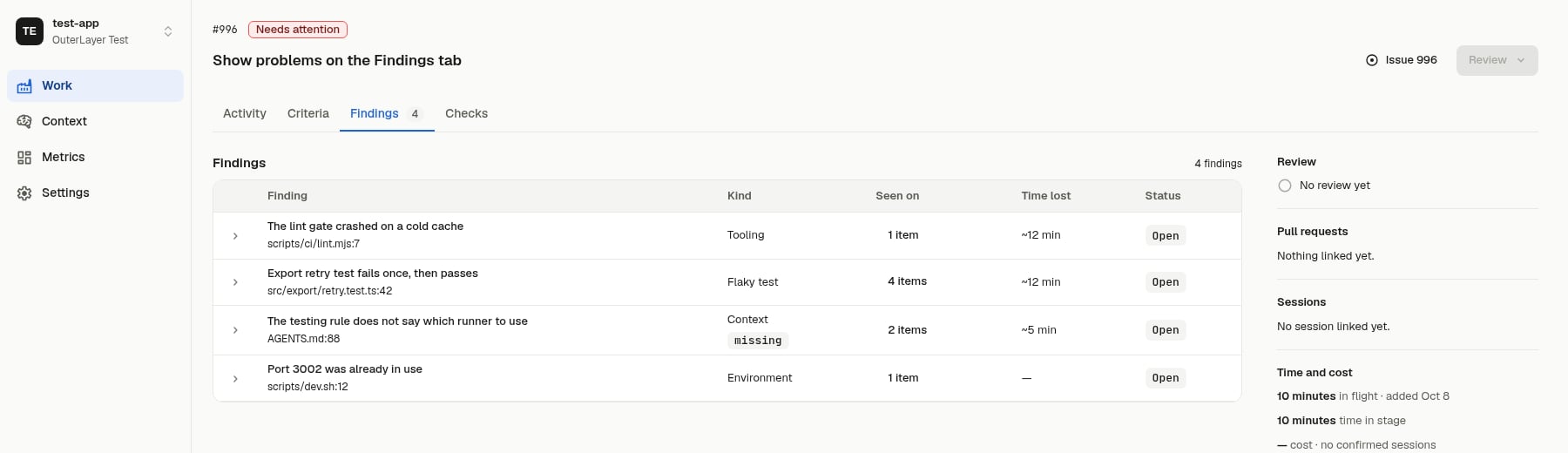
The Findings tab shows each finding's problem, how many items reported it, and the time it cost.
- Finding: the one-sentence title, and the file and line it is about. For a
contextfinding it names the instruction’s path and line. - Kind: the finding’s category. A
contextfinding also shows whether the instruction iswrong,brokenormissing. - Seen on: how many items reported the finding’s problem, such as 3 items. Select it to open the problem drawer.
- Time lost: the approximate minutes between the two events the agent marked, such as ~12 min. A row of several reports shows their minutes added. A finding with no marked events shows a dash.
- Status: every problem is Open today.
Expand a row
Select the arrow at the start of a row to read the longer account:- What happened, Cause and What would help, as the agent recorded them.
- Rule: for a
contextfinding, the instruction’s path and the quoted sentence. - A fix goes to: the repository to change. For a
contextfinding this is the control-plane repository and its commit when one was recorded. Otherwise it is the repository of the item’s first pull request. - What the agent was doing, as it recorded it, such as “build session”.
- Problem: each problem the finding reports, and how the finding joined it: by matching an earlier report, by the agent’s link and its reason, or as the first report.
- Open the session: a link to the agent’s session at the turn it recorded.
The problem drawer
Select a row’s Seen on count to open a drawer for that problem. It shows the problem’s title, kind, status, item count and the total time lost. Under that it lists every report, newest first:- the item it was reported on, linked to the item
- the date and the time it lost
- the finding’s title
- how it joined the problem: “matched an earlier report”, the agent’s reason, or “first report”
- Open the session, a link to the session at the window the agent marked
- for a report that also reports another problem, a link that opens that problem’s drawer
evidence.read permission. Without it the tab shows no findings.
An item with no findings shows No findings. Findings do not affect whether the work passes. No check, policy or merge gate reads them.
Read them across the factory
The Findings page in the sidebar lists every problem your work items reported, with the most time lost first. It sits between Work and Metrics. It needs theevidence.read permission, and a member without it sees no entry.
A row is a problem, not a finding. A problem reported on ten items is one row. Each row has these columns:
- Problem: the problem’s title. Select the row to open the problem drawer described above.
- Kind: the category of the problem’s newest finding.
- Items: how many work items reported the problem.
- Reports: how many findings joined the problem.
- Time lost: the approximate minutes the reports lost, added together. A problem with no measured time shows a dash.
- Last seen: when the problem was last reported.
- Kind: one of the six categories in the table above. A problem matches when its newest finding has that category.
- Period: the last 7 days, the last 30 days (the default), the last 90 days or all time.
- Search: type in the search box. A problem matches when its title contains every word you type, ignoring case.
Read them over the API or MCP
Four read-only routes rank a factory’s problems and read findings back. Each is also an MCP tool, and each needs theevidence.read permission, which the Reader preset holds.
GET /v1/problems(toollist_problems) ranks the factory’s problems byreports(work items affected, the default) orminutesLost. Each row has its strict keys,reports,findings,minutesLostandavgMinutesLost.GET /v1/problems/{problemId}(toolget_problem) returns one problem’s figures and its findings, newest first, at most 100.GET /v1/findings/summary(toolget_findings_summary) returns time lost per category. A finding counts once even when it reports two problems.GET /v1/work-items/{workItemId}/findings(toolget_work_item_findings) returns one work item’s findings, newest first and at most the newest 500 (pagination.truncatedis true when there are more), with the problems each reports. A key scoped to one work item can read its own item’s findings and no other’s.
since and until limit every figure to findings recorded in that window. A problem with none in the window is left out. command matches problems with a finding whose command contains the text, ignoring case. file matches a path prefix on a finding’s file or rule path. A finding that reports several problems counts in full toward each, so the list does not add up to a total. Use the category summary for totals.
Reduce check failures
To find and fix the check that costs the most:- Call
list_problemswithcommand=pre-pushandsort=minutesLost. The first row is the costliest pre-push problem. - Call
get_problemwith its id. The findings give the cause, a suggestion, the error line and the strict keys. A strict key is the exact text that joins a finding to the problem, so search your scripts and logs for it. - Fix the check, the test or the rule, and open a pull request.
- After it merges, call
list_problemsagain withsinceset to the merge time. If the problem is gone from the list, or itsreportsstopped growing, it stopped recurring.
How findings group into problems
The same problem gets recorded again and again, on different items and in different words. Every finding therefore links to one or more problems: one thing in the factory that keeps costing time, reported by every finding that hits it. A problem belongs to your factory and lists every work item that reported it. Nobody merges or confirms anything. The agent that records the finding decides, using three rules. The three rules for what counts as the same problem:- Same problem means one fix resolves both. The same error or symptom is not enough.
- A gap in the instructions is its own problem, separate from the thing it fails to mention. They are fixed in different places.
- A finding can report more than one problem. Link each one, or record one finding per problem.
- A key matches. The finding’s own fields make keys. For example, a wrong instruction is keyed by the file that holds it, the quoted sentence and how it fails. A tooling finding is keyed by the command and its first error line, with numbers, hashes, paths, versions and durations ignored. A flaky test is keyed by test file and test name. A command alone never joins: two different problems can fail the same command. When a key belongs to a problem, the finding joins it, whatever the agent says.
- The agent names the problem.
--problem <id> --link-reason <text>links the finding to that problem. Repeat--problemfor each problem the finding reports. - The agent asks for a new problem.
--newcreates one, titled with the finding’s title. - Otherwise the agent chooses. The server searches every problem in the factory, whatever its category or repository, and returns the three closest. Nothing is stored. If nothing is close, a new problem is created.
Choose among candidates
When the search finds close problems,outerlayer emit finding prints each one. It shows the problem’s id, title, how many reports it has, and the title and cause of its reports. It then prints the three rules and exits with exit code 3. Exit code 3 is not a failure: it means the finding was not stored and needs your choice. The last lines say how to continue, so 2>&1 | tail -3 still shows them.
--problem <id> --link-reason <text>when the finding reports an existing problem. Repeat--problemfor each one.--newwhen none of the candidates is the same problem.
new. A key join shows none, and so does a search that found none. Running the command again with an id already recorded on the item replaces that finding and keeps its problems.
outerlayer emit findings <file> stores the findings that match a key, lists the ones that need a choice, and exits with code 3. Add problems with linkReason, or new: true, to those entries and run it again.
Mark when the problem started and ended
Every finding records how long the problem took. The CLI reads two events from the session’s transcript on your machine, and from the transcripts of the subagents it ran:- Start: the event named by
--started-at. Without it, the start is the first tool output that contains the finding’s--errortext. - End: the event named by
--ended-at. Without it, the end is the newest event, the moment the finding is recorded.
--started-at e118. An id with a prefix, such as a5c9fb78:e42, is an event of the subagent that prefix names. --find <text> lists every event that contains the text, older ones included, and records nothing. --untimed records a finding with no time, for a problem that cost none in this session.
The server stores both events and the minutes between their times. A finding recorded where the CLI finds no transcript records no time, and still counts toward how often the problem occurs. Only Claude Code sessions have a transcript the CLI can read today.
Record one
An agent records one finding withouterlayer emit finding, or a batch from a JSON file with outerlayer emit findings. Each finding needs an id, a category, a title, a file and where it was recorded. It can also carry the cause, detail and suggestion, and the command, error line, test name or symbol that let the factory recognise the problem next time.
The maintained outerlayer-findings skill tells agents when a problem is worth recording. outerlayer init installs it when you run init in a git repository.